


If you were forwarded this newsletter, join 6,144 weekly readers—some of the smartest GTM founders and operators—by subscribing here:
Thanks to the companies that made the AI x GTM Summit possible! (+attendee stats/notable attendees)
Getting agents deployed into your GTM systems
Pitfalls, opportunities, and best practices with Joe Rhew
“Agents” is the buzzword of the moment. Everyone’s talking about them. But very few people have actually built and shipped one into production.
Over the last 12 months, exploring this space, my experience with agents has been much more nuanced than the (social media) hype suggests. You’re not going to replace all your workflows with agents. You’re not going to let AI run wild on your prospects. Especially in the enterprise. The reality is messier—and more interesting! And figuring out that messiness is where the alpha is today (because, so few GTM teams are actually deploying agents at scale).
In Session #3 at the AI x GTM Summit, Joe Rhew broke down what he’s learned deploying agents for clients at The Workflow Company. I’ve found that Joe is usually about six months ahead of the curve on AI in GTM. What he’s building today is what everyone will be talking about in six months. And he’s not just building theoretical toys or shiny demos. He’s shipping real agents, automated workflows, and everything in between, into production.
For example, he didn’t build his slides/presentation in Google Slides or even Gamma. He built it in github lol (check it out). Legend.
Here’s what he covered in this session:
The spectrum: workflows vs. agents (definitions + when to use each)
Context engineering > prompt engineering (the new skill)
Unified context powers everything (build once, use everywhere)
Live demo/examples: deterministic vs. agentic workflows
Lessons learned (6 principles for deploying agents)
→ Follow Joe on LinkedIn! He consistently shares (bleeding-edge) ways he’s using AI in his company.
[Suggested Spotify playlist while reading this series]
IYMI:
Session #1 → Sorting the World into your CRM (GTM gold is stuck in your top seller’s brain: How to extract + operationalize it) || YouTube video of Matthew and Andreas’ full session (22 mins)
Session #2 → Infrastructure for agentic GTM: data stack, orchestration, and activation || YouTube video of Nico’s full session (23 mins)
Alright, let’s get into it.
The spectrum: workflows vs. agents (definitions + when to use each)
Joe was one of the first people to help me understand the subtle, but important differences between a workflow and an agent. And why you would want to use one versus the other (or a combination!).
He laid out the spectrum:
Workflows → A predetermined, deterministic set of steps. No LLM involved. Think Zapier automations or HubSpot sequences. You control 100% of the inputs and outputs.
Agentic Workflows → Still has a predetermined sequence, but there’s an AI step in the middle. You send a prompt to an LLM, get a response, and turn it into structured output (like JSON) so you can do something deterministic with it. Example: “Write a sequence of three emails and return them in JSON format so I know exactly where to find each one.”
Agents → Tools on loops with a goal. You give the agent an objective and some tools, and it runs loops—calling tools, observing results, thinking, acting—until it reaches the outcome. You’re not feeding it deterministic inputs or expecting deterministic outputs. You’re trusting it to figure things out.
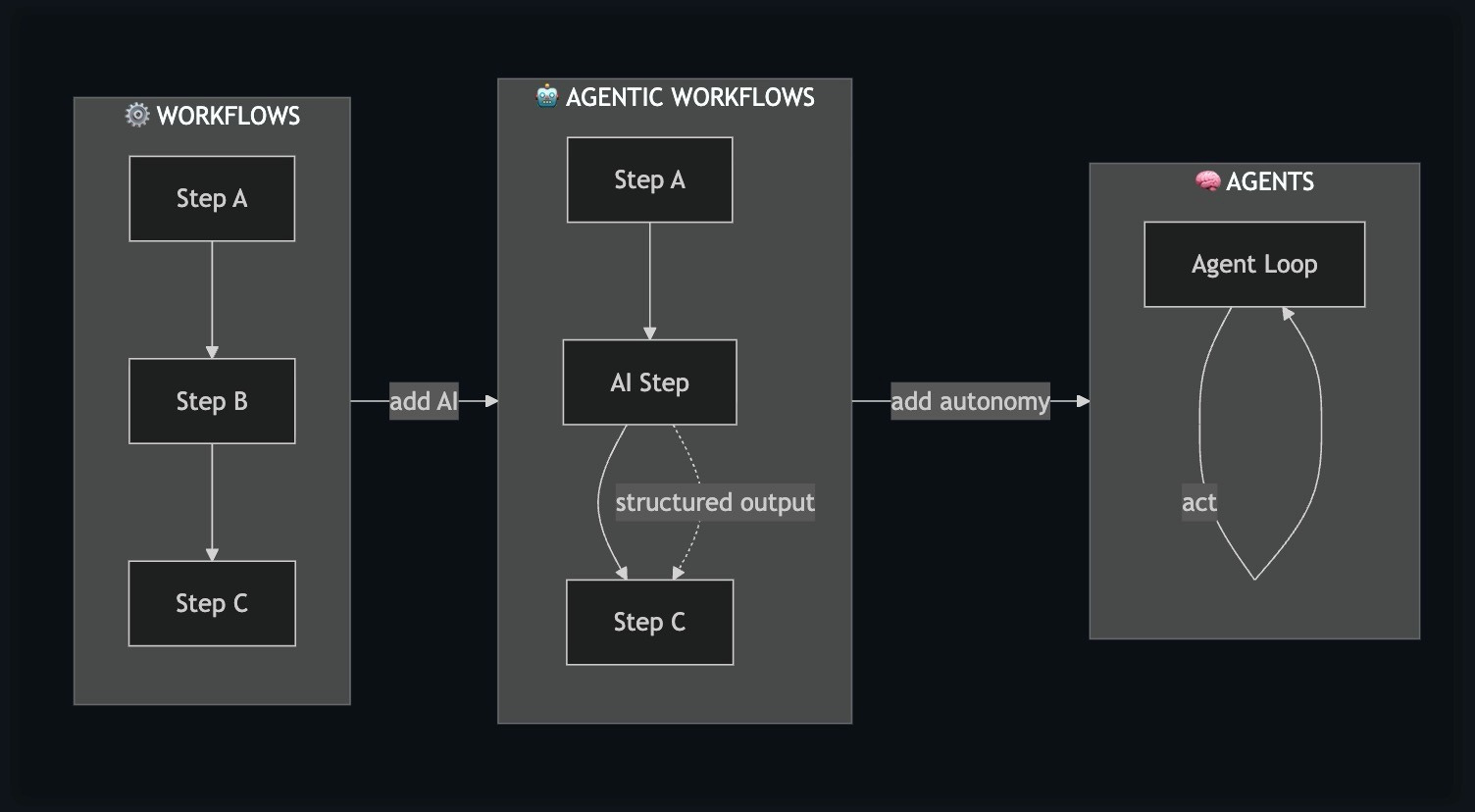
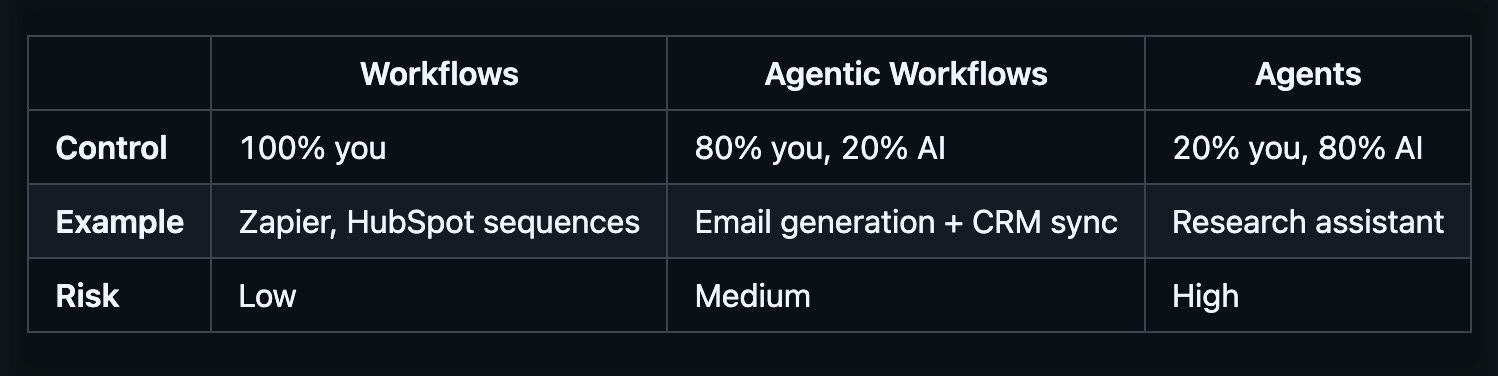
The key insight: these aren’t competing approaches. They’re a spectrum. And the best GTM systems use all three—starting deterministic, adding AI where it helps, and reserving full autonomy for the right use cases.
I came into 2025 thinking agents would replace workflows entirely. My thinking has evolved. There are real advantages to hard-coded, logic-based components: predictability, cost savings, debuggability. The future isn’t “agents everywhere”—it’s knowing when to use each approach.
Context engineering > prompt engineering (the new skill)
Remember when “prompt engineer” was the hot new role? That’s already evolving.
“Context engineering is the delicate art and science of filling the context window with just the right information.”
—Andrej Karpathy
Not more. Not less. Just the right amount of information.
This matters because there’s a degradation of performance when you cram too much context into an agent. And there’s terrible output when you give it too little (eg: try having ChatGPT write a cold email for you, without any other context about your business or previous interactions you’ve had with the prospect). The skill is knowing exactly what to include.
Prompt engineering example:
“Write me a cold email. I target heads of sales at Series B companies.”
The LLM gives you something generic / not useful.
Context engineering example:
Feed the LLM: your product info, the exact persona (eg: VP of Sales), the prospect’s LinkedIn data, and your writing guidelines for cold emails and good examples. Then ask the LLM to do the same task.
Same AI/model, different context = completely different results. It’ll be personalized, relevant, on-brand, and contextual. And actually usable.
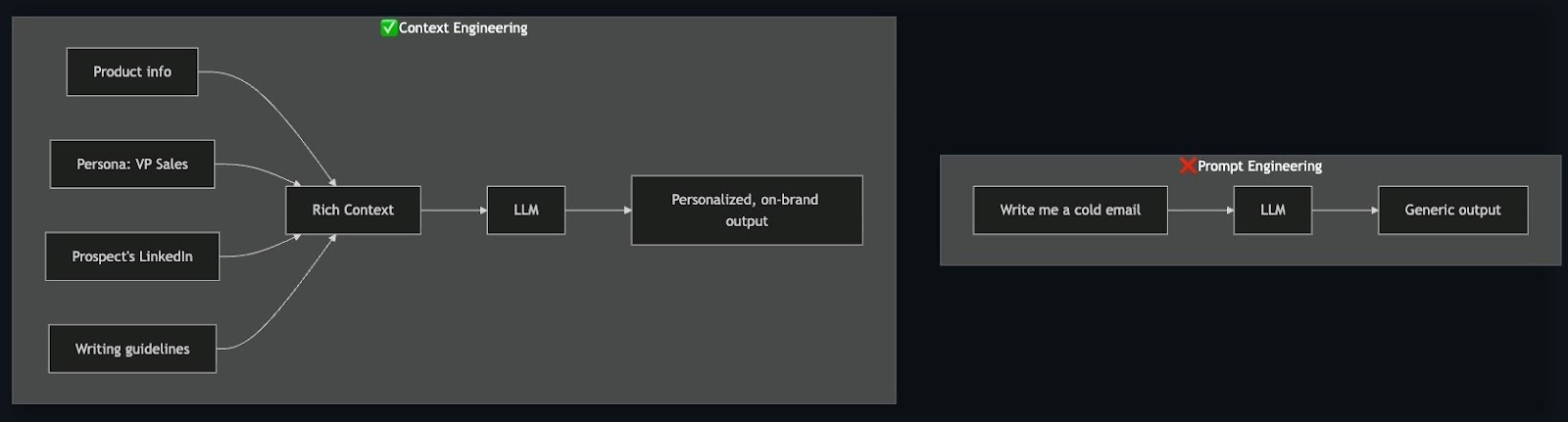
The shift: instead of crafting clever prompts, you’re architecting what information the AI has access to. That’s the new skill to develop.
Unified context powers everything (build once, use everywhere)
The real magic of this new way of building is knowledge (context) compounding over time.
Joe showed how The Workflow Company stores their GTM context: markdown files in a GitHub repo. Products. Personas. Messaging. Campaign angles. Guidelines.
The best part is, he didn’t type any of it out manually.
He pulled in emails, Slack messages, marketing website copy, LinkedIn posts—fed it all to an LLM with some feedback—and it generated the structured context files. The AI built its own knowledge base.
And now that context powers everything:
Workflows (automated sequences)
Agentic workflows (personalized emails)
Full agents (research and strategy)
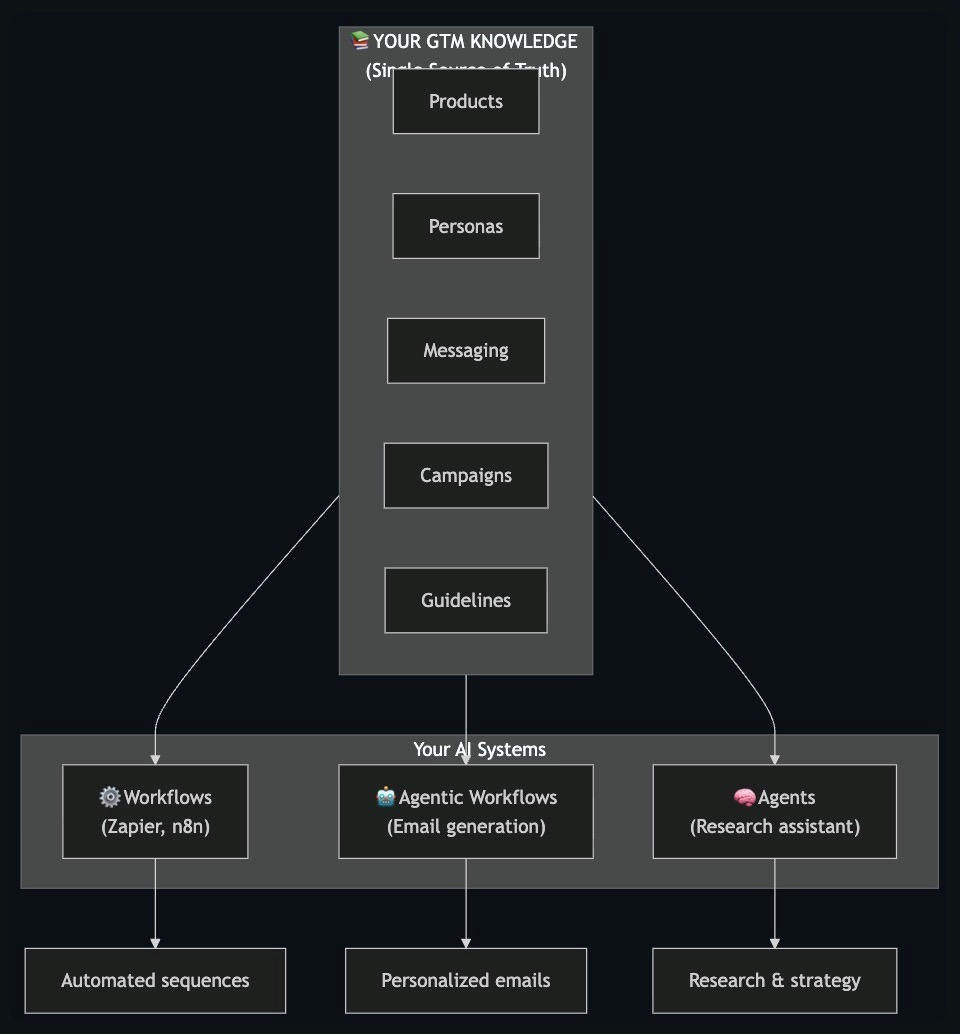
The magic: Update your knowledge once, and all your AI systems use it immediately. No code deploys. No manual syncing across tools.
This is the foundation that makes agents actually work. Without unified context, every AI touchpoint is starting from scratch. Or worse, working from inconsistent information.
Live demo/examples: deterministic vs. agentic workflows
Joe showed two versions of the same use case: handling a website visitor (a play I’ve written about before).
Demo 1: Deterministic workflow (human-in-the-loop)
RB2B identifies a website visitor. The visitor’s LinkedIn URL hits a Slack channel. The system automatically processes the LinkedIn profile and surfaces who they are.
Then it stops. And waits for a human.
Joe explained why: “I get a bunch of hits from people that I don’t want to talk to. People that aren’t a good fit. So I manually tell the system to generate a sequence.”
Only after human approval does it research the prospect and draft emails. Then those emails can be enrolled into a sequence.
This is agentic, but with guardrails. The AI does the work, and the human makes the decisions.
Demo 2: Full agent (conversational, autonomous)
Joe chatted with a Slack bot.
He asked: “Tell me about the personas we target at WFCO.”
The agent read the personas markdown file, checked what other files were available, and responded with the full breakdown (eg: target personas, anti-personas to avoid, everything).
Then he asked it to evaluate a specific prospect (me! 👋): “Based on those personas, is Brendan Short a close match? Let’s think about our outreach strategy.”
The agent used tools to fetch my LinkedIn profile, read my recent posts, pulled in messaging guidelines and product info, and concluded: “Strong fit, but not as a traditional customer. He’s a content creator, thought leader, influencer. Not a buyer—but valuable as a referral source, network access, credibility builder, content collaborator.”
Which is exactly why I invited Joe to speak at the summit! Wild to see it so spot-on in its reasoning.
The agent then suggested partnership outreach instead of a sales approach and drafted appropriate emails.
The feedback loop:
Joe then told the agent: “Based on this, let’s add an appropriate persona for Brendan to our context.” This is a perfect example of how interactions with agents should be an ongoing thing that informs the context as your GTM (and learnings) evolve over time.
The agent proposed adding a new “Influencer/Referral Partner” persona to the personas file. Just like that, the system evolved — not through a scheduled “persona review meeting,” but as a byproduct of doing actual work.
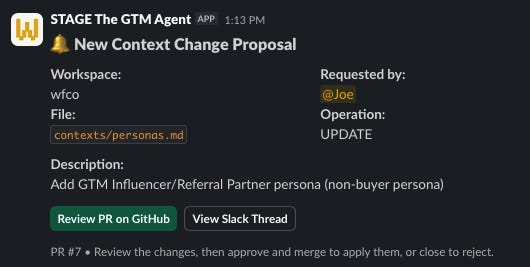
What most people understand: agents automate things intelligently and with agency.
What most people miss (and the real unlock of using agents): every task you run through the system generates byproducts—edge cases, new patterns, gaps in your framework. Most tools let those insights evaporate. An AI-native unified context system captures them and feeds them back in. So, the work improves the system. And the system improves the work. It compounds.
Lessons learned (6 principles for deploying agents)
Joe closed with principles from deploying these systems into production.
1. Start deterministic
Build reliable workflows before adding AI autonomy. Full control over inputs and outputs first. Then layer in intelligence.
2. Human-in-the-loop always (at first)
Approvals are cheap. Mistakes are expensive. Phase out human review slowly as you build confidence in the system.
3. Keep agents internal
Use them for research and brainstorming before you ever let them touch anything customer-facing. Joe’s Slack agent doesn’t send emails until he explicitly tells it to. Less risk of public messes.
4. Shared context foundation
Same knowledge powers all your AI tools. Build it once, build a mechanism to update it well, and you don’t have to worry about consistency.
5. Build modules → tools
Test a function until it’s reliable, then wrap it as a tool you can give to agents. Modular design lets you swap components in and out.
6. Minimize abstraction
With Claude Code, you can talk directly to an LLM and have it write scripts, code, whatever you need. The cost of abstraction layers (drag-and-drop UIs, etc.) is becoming too high. Work closer to the metal.
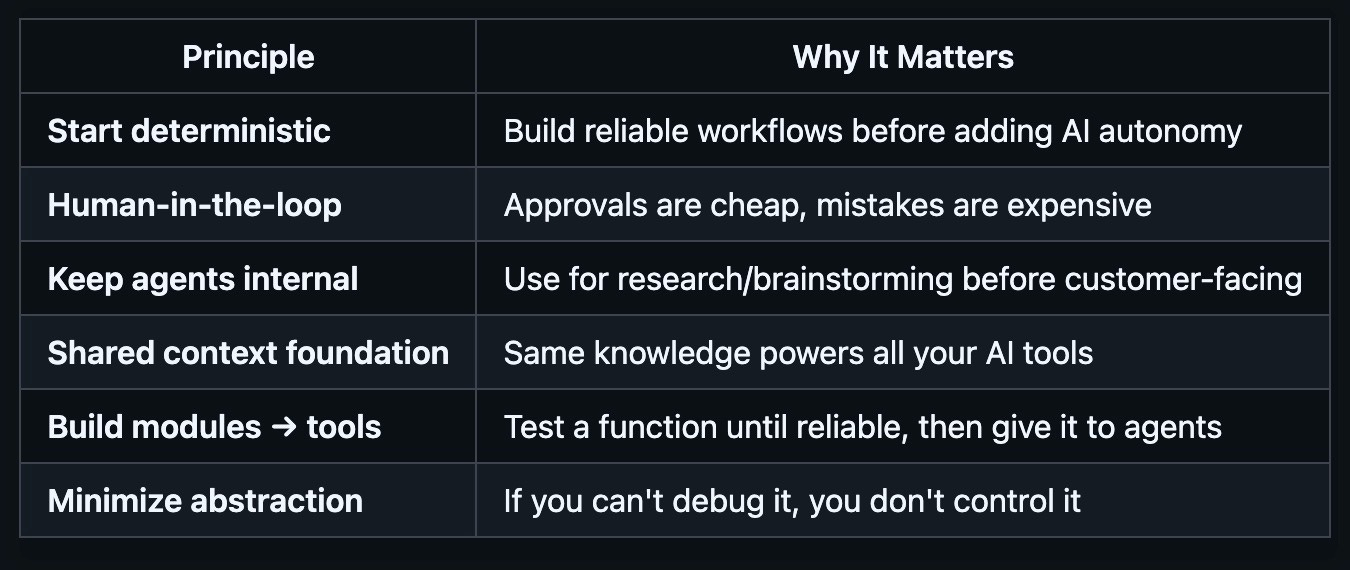
The Bottom Line
Joe’s session reframed how I think about agents in GTM. He helped me evolve and expand my thinking about the pros and cons of workflows.
It’s not about replacing everything with AI. It’s about building a spectrum of automation—deterministic where you need reliability (and cheap scale), agentic where you need flexibility, and fully autonomous only where you’ve earned the right to trust it.
The foundation is context: unified, structured, continuously updated context that powers every AI touchpoint in your system.
The framework (summary):
Build your context layer (products, personas, messaging, guidelines)
Start with deterministic workflows
Add AI steps where they help
Keep humans in the loop
Graduate to full agents only for internal, low-risk use cases
Let the system learn and evolve
The teams that get this right will have GTM systems that literally get smarter over time (you can think of this as building a “System of Intelligence” in-house). And the teams that skip the foundation (context layer) will wonder why their agents keep hallucinating and their automation feels chaotic, complaining that AI is overhyped.
Watch the full session on YouTube (19 minutes):
I appreciate Joe giving us a glimpse into the future of how we’ll use AI in GTM!
Follow Joe Rhew on LinkedIn.
→ Joe runs The Workflow Company (wfco.co), an AI-native GTM operations firm that builds GTM systems across the full spectrum — from deterministic workflows to autonomous agents, all powered by unified context. If you’re trying to figure out how to actually ship this stuff into production (not just talk about it), reach out to him directly. He’s truly building at the bleeding edge.
Session #4 summary coming next: Nuanced viewpoint on AI-generated outbound email copy.
Thank you for your attention and trust,
Brendan 🫡
PS: Check out the sponsors that made this event possible: Rox, Attention, Clarify, Sumble, Instantly.