


If you were forwarded this newsletter, join 11,361 weekly readers—some of the smartest GTM operators & founders—by subscribing here:
Thanks for reading this hand-poured, farm-to-table (human-written) newsletter.

Hey, y’all!
I’m back from a bit of travel and excited for today’s (guest) post on how to operationalize AI for revenue teams.
My guest is Pouyan Salehi, who I have known for about a decade now, and is deeply familiar with B2B revenue. He previously co-founded Scratchpad and PersistIQ. And now, he’s working on Clearskies, “the context layer for revenue.” He’s talked with dozens of companies about this problem, and spent a ton of time putting together today’s article. I’m really excited for how it turned out. I believe it is going to help a lot of revenue leaders think through this concept. And, I predict, the “context layer” is something that will continue to be a hot (and increasingly important) topic this year.
Alright, with all of that said, let’s get into it.
Most revenue teams I’ve talked to are in a similar place with AI. A few people on the team have built useful workflows and agents while the rest of the team is in one-off chats, if they use it at all.
This is a strange place to be stuck because the hard part, intelligent models, is supposedly behind us. The models are incredible now and the harnesses are improving rapidly. Just look at how much Claude Cowork and ChatGPT Codex have changed in the last few months, and at what Grok Bot can do immediately out of the box.
Usually it looks like this. A seller has an agent that drafts her follow-ups, and they’re good enough to send. A manager has a workflow that pulls his notes together before 1:1s and saves him an hour a week. The value is there but it’s dependent on whoever built it.
There are two states a team can be in. In the first, AI works for one person at a time. In the second, AI takes on meaningful jobs in the revenue function, across the whole team. I’ve started calling the gap between them operationalizing AI. Getting one person to the first is fairly easy now; helping a whole team reach the second remains a challenge.
The rest of this article is about why that gap exists and what closes it.
What it means to run on AI
Operationalizing AI means moving from one-off questions and chat to AI taking on meaningful revenue work that runs reliably, produces outputs the team trusts, and reaches the whole team. Reliable means the work happens whether or not someone remembers to ask for it. Trusted means the team acts on the output without checking it first, because it’s accurate and grounded in what actually happened with the customer. Team-wide means it runs for each person who needs it, not only for the person who built it.
Some of this work is scheduled, like a pipeline risk report that lands in Slack or Teams before the Monday forecast call. Some of it is on demand, like asking for a deal review ten minutes before a call. Both count as operationalized when the answer comes from the same complete, trusted context every time, for everyone on the team, rather than from whatever one person’s connectors happened to pull that day.
Plenty of teams have a pre-call brief or a post-call CRM update running, and that’s the right place to start. The test is whether it meets all three conditions. If the brief runs only for the rep who built it, or nobody can say what data it read, it’s a useful workflow and not an operationalized one.
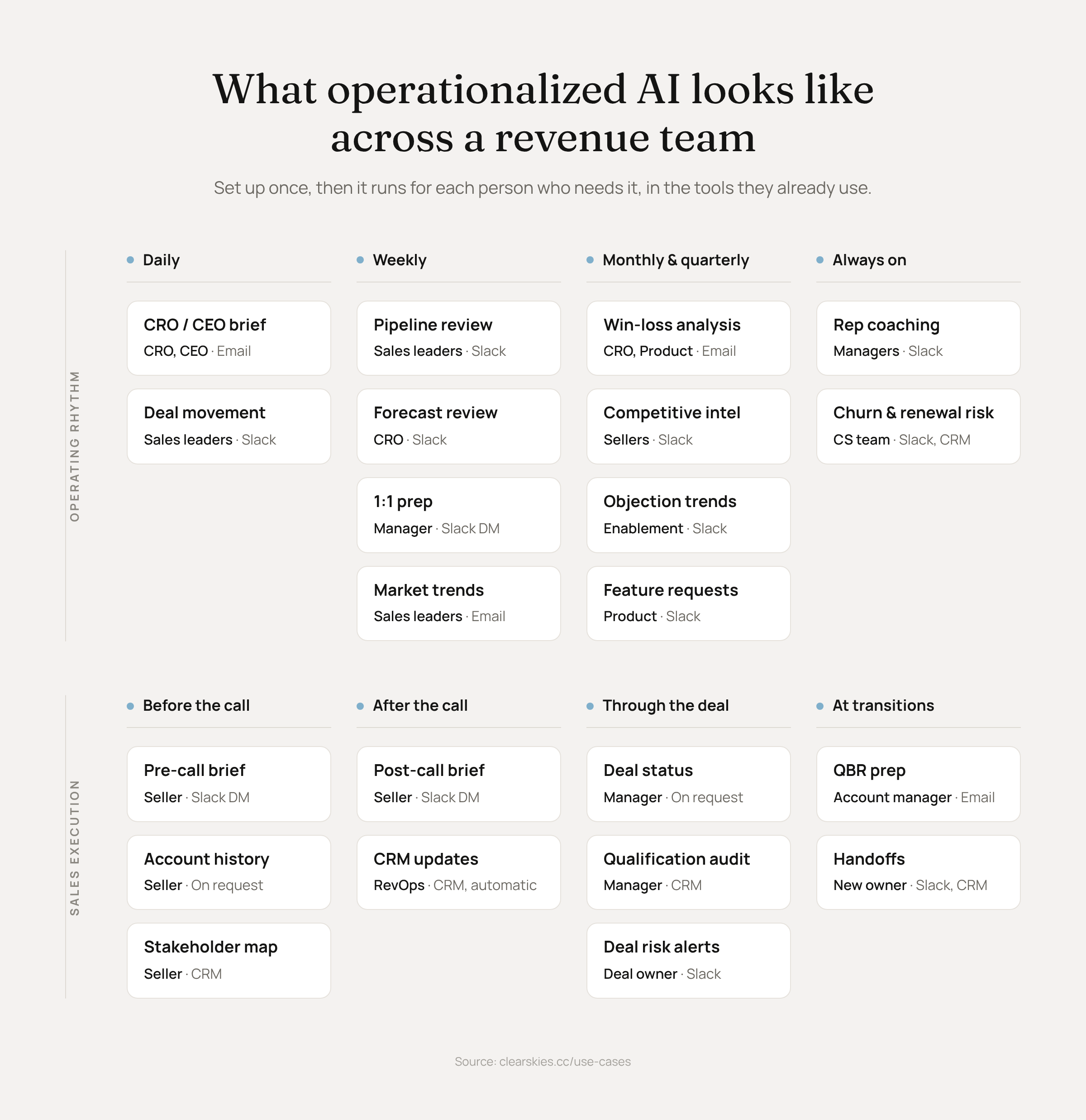
Those examples are also a small corner of the work. When I ask a revenue leader what they’d hand to AI, they usually name three or four things, mostly around calls. But think about everything a revenue org does daily, weekly, monthly, and quarterly. There’s how you sell (Sales Execution): call prep, follow-ups, CRM updates, deal reviews, handoffs. And there’s how you run sales (Operating Rhythm): the pipeline review, the forecast, the leadership brief, coaching, win-loss, objection trends. Lay it all out and it’s dozens of jobs to be done, across sellers, CSMs, SDRs, RevOps, and sales leadership. Operationalizing means handing those jobs to AI one at a time, and when it’s working, each one is easier to hand over than the one before it.
Hurdles to fully operationalizing AI
We’ve talked to a lot of revenue teams about this, and the same six hurdles come up again and again. Here they are, with what each one costs a team.
No strategy on what to build. Most teams got licenses to Claude or ChatGPT and a mandate “use AI”, and skipped the step of deciding which jobs AI should take on first and who owns each one. One company told us their rollout to reps came with a single instruction, which was to use it for everything, so what got built was whatever someone happened to be interested in. The cost is spread across one-off experiments, three people solving the same problem three different ways, and a leadership team with no good answer for how the team is using AI.
The second workflow is as hard as the first. The idea carries over from the first workflow to the second, but the context doesn’t, so each new agent assembles the customer picture from scratch on every run: unifying records from the CRM, calls, calendar, and email, mapping activities, building timelines. That shows up as slow runs, a token bill that grows with each workflow because each one redoes the same assembly, and answers that don’t match: run the analysis on Monday and again on Tuesday, and the account has changed but the answer hasn’t.
Workflows break. The workflow ran on Tuesday, failed on Wednesday, and you found out the following Monday when the forecast report was a week old. Homegrown setups rarely have alerting, and neither do connectors on their own, so the job that was scheduled under one person’s account dies quietly when a rate limit hits or one of the six connectors it depends on breaks and the whole workflow stops. The failure is usually silent, and silent failures surface at the worst possible time.
It looks right, but it’s wrong. Most teams have yet to hit this one, because you only find it by checking (more on this below). One team looked into an analysis Claude had produced for them and found it had read five calls, when there were more than thirty with that customer. The output didn’t say it had looked at five; it presented itself as the answer. If you don’t know what data was behind your AI’s last answer, you have no way of knowing whether this is already happening to you.
Adoption is still hard. This was a problem before AI, and it’s a bigger problem now because agents produce far more output than people did. A link dropped in a Slack channel counts as delivery, and it still gets scrolled past. What gets used is output that shows up inside the work itself: the brief on the calendar invite, the risk flag on the opportunity record, the summary in the thread where the deal is already being discussed. One leader we spoke with shared that there wasn’t a single AI artifact his team used daily.
Brittle dependencies. Most homegrown setups run through one person: their account, their logins, and their understanding of how it’s wired. One revenue leader we work with built his own CRO brief out of a custom Salesforce MCP, an automation tool, a file watcher, and a laptop kept awake overnight, with a scheduled job to restart the VPN at 3am. It ran about 70 percent of the time, and on the mornings it failed, the leadership channel in Teams got last week’s brief instead of this week’s. If he’s out for a week and the brief stops sending, the rest of the team doesn’t know how to fix it.
Where connectors stop being enough
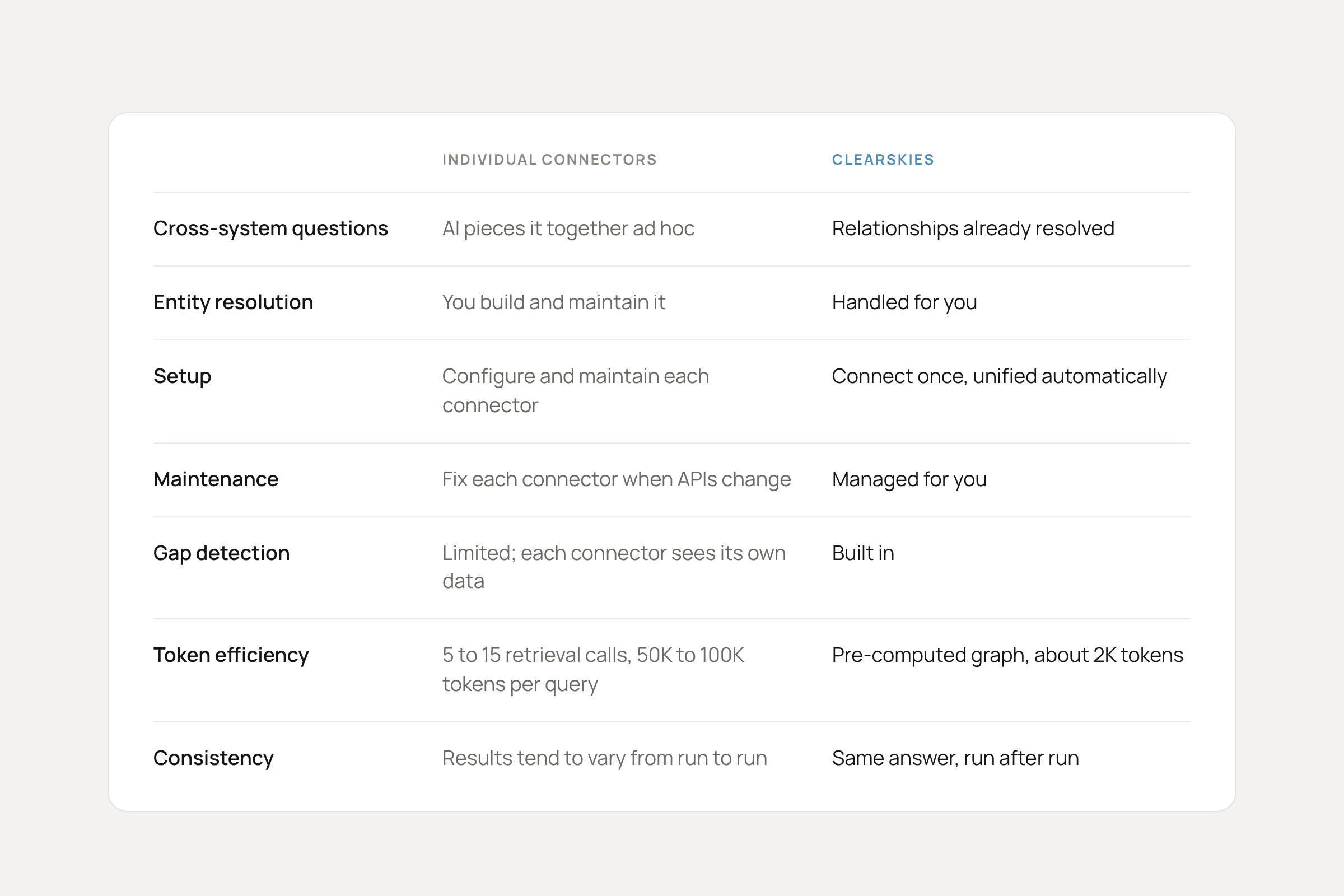
Some teams are wiring up connectors, and connectors are good at what they’re designed for: one deal, one call, one seller, the data sitting in a single tool, and a person who can eyeball the answer. They stop being enough when the job needs the whole customer picture: several tools, several people’s records, and months of history. Now the model has to assemble that picture itself, on each run, from whatever each connector returns, and it only knows what came back. It tends to miss that the contact in the CRM and the voice on last week’s call are the same person, and it rarely flags the email thread or conversation in Slack it skipped.
Two more limits matter for team-wide work. Email and calendar connectors are tied to one person’s account, so when a leader asks an agent about a deal, the agent reads the leader’s inbox and not the seller’s, and the thread that answers the question is usually in the seller’s. And a connector answers from whatever is in that one tool right now, so a question about how a deal got to where it is leans on whatever history that tool happens to keep, with nothing carrying over from the last run.
The customer context problem
Most of the hurdles above trace back to one thing. Customer context.
The models are not the issue, and neither are the harnesses. What they lack is any idea who your customers are, who your team is, or how you sell. The real record of a customer is spread across calls, email, calendar, Slack or Teams, and support tickets. The CRM holds a secondhand version of it, written up after the fact. So each time an agent runs, it has to reconstruct that record before it can start, and each reconstruction is partial, expensive, and a little different from the last one. That’s why the second workflow isn’t easier, why the answer is sometimes wrong, and why one broken connector takes the whole job down.
The fix is to build the record once, keep it current, and let each agent read from the same one, which is what a context layer is. When the context is already there, the agent does the job instead of doing the archaeology first. Brendan went deeper on why every revenue team needs a context layer in his piece on The Signal.
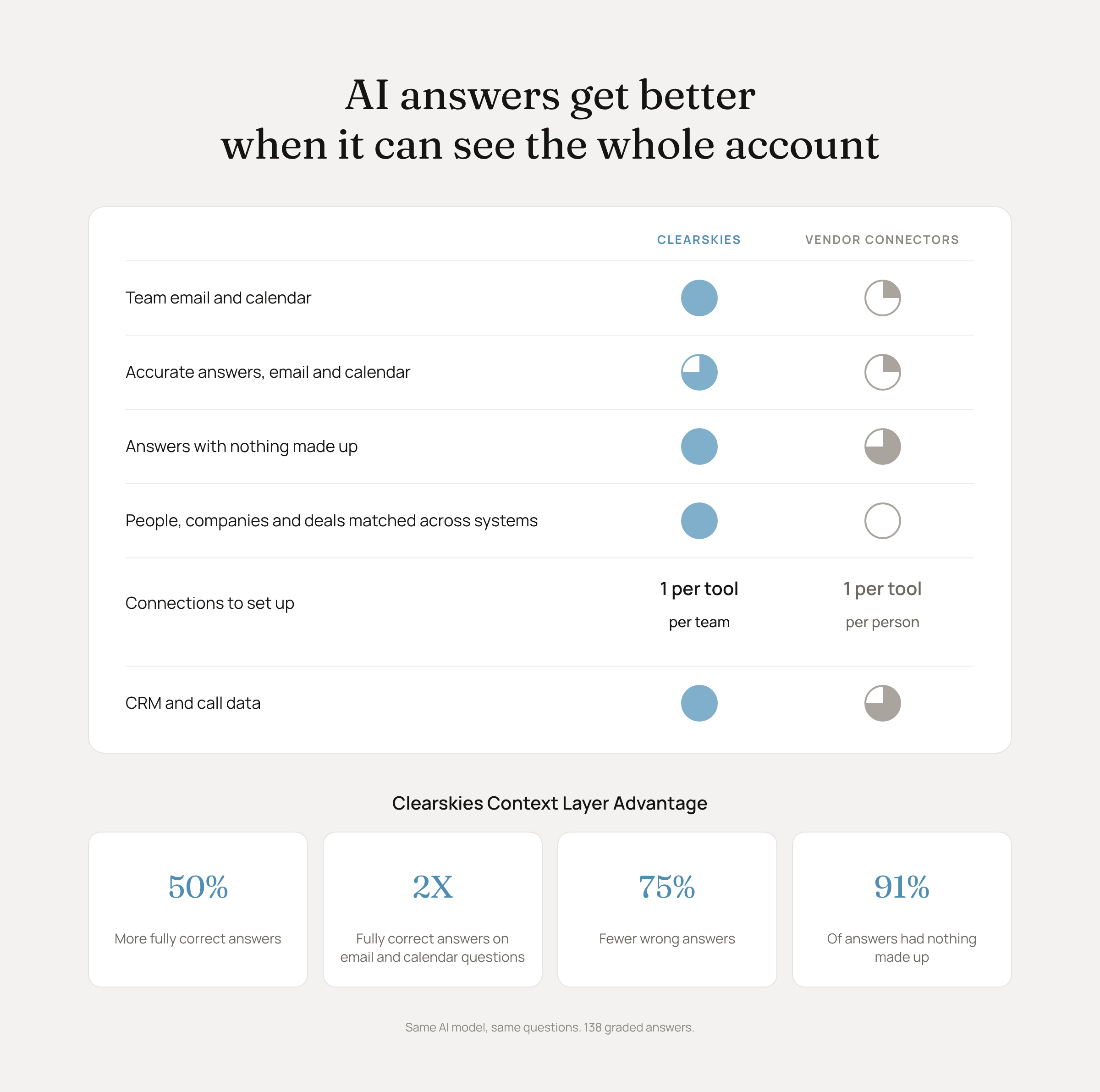
The accuracy point is hard to make in a demo, because a wrong answer looks exactly like a right one. So we measured it. We gave the same model the same 23 questions about five real accounts, with the same instructions, once through connectors and once through Clearskies. The stack was HubSpot, Scratchpad call transcripts, and Google Workspace. Each question was asked three times in each setup, 138 answers in all, and a separate model graded every answer against an answer key built from the source systems, with the system names blanked out, so it couldn’t favor either side.
Through connectors, the model got 43 percent of the questions fully right. Through Clearskies, it got 65 percent fully right. That’s 50 percent more correct answers from the same model on the same questions, 40 percent fewer invented facts, and the same cost per answer, with fewer tool calls to get there. Clearskies was ahead even on questions that only needed the CRM and calls, where connectors could see everything. The gap opened wide on questions that touched email or calendar, which is most of what a leader asks about a relationship: who’s been on the calls, whether the proposal went out before or after the last conversation, which meetings have no follow-up. There, Clearskies was fully right nearly twice as often. And on the measure this article is about, answers that look right and aren’t, the wrong-answer rate fell by three quarters across the whole test.
The reason is structural. Gmail and Calendar connectors are per-user, so there isn’t a way to give a model the whole team’s mail and meetings through them. The model reads one seat, and when the thread it needs is in someone else’s inbox, it doesn’t know the thread exists, so it guesses or confidently answers a narrower question than the one you asked. Clearskies syncs every user’s mail and calendar into one record, already matched to the account, so the thread is there before the question is. The model wasn’t smarter in one case than the other. It could see more.
And 65 percent is where the layer is today, not where it stops. We use this test to find what the context layer still misses and close it, so the number moves up with each release while the model and the questions stay the same. That’s the real case for a context layer over the alternatives. Build your own and you climb that curve yourself, release by release. Use connectors alone and the model is capped at what one seat in one tool can see. Use a layer that’s measured and improved on a schedule, and your agents get more accurate without anyone on your team touching them.
Where to start
Start with the context, since everything else gets easier once it’s in place. There are two ways to get there.
You can build it yourself. Vercel’s team has talked about building theirs, and it works, but it takes real data engineering to stand up and more to maintain as your sources and your business change. If you have the engineers and this is strategic for you, this is a legitimate path.
Or you can use one that’s already built. I’m biased here, because this is what we make at Clearskies, and the job it does is to give your agents the right customer context and the tools to take on real revenue work. You connect your sources once, and from then on you build from whatever AI provider you already use. The agents run for the whole team rather than in one person’s account, and the context works with whatever model you point at it, so when the next one comes out you connect it instead of starting over.
That last part isn’t hypothetical. The week Grok Bot came out, we connected it to our customer context in a few minutes, and it started proactively flagging deals to us without being asked.
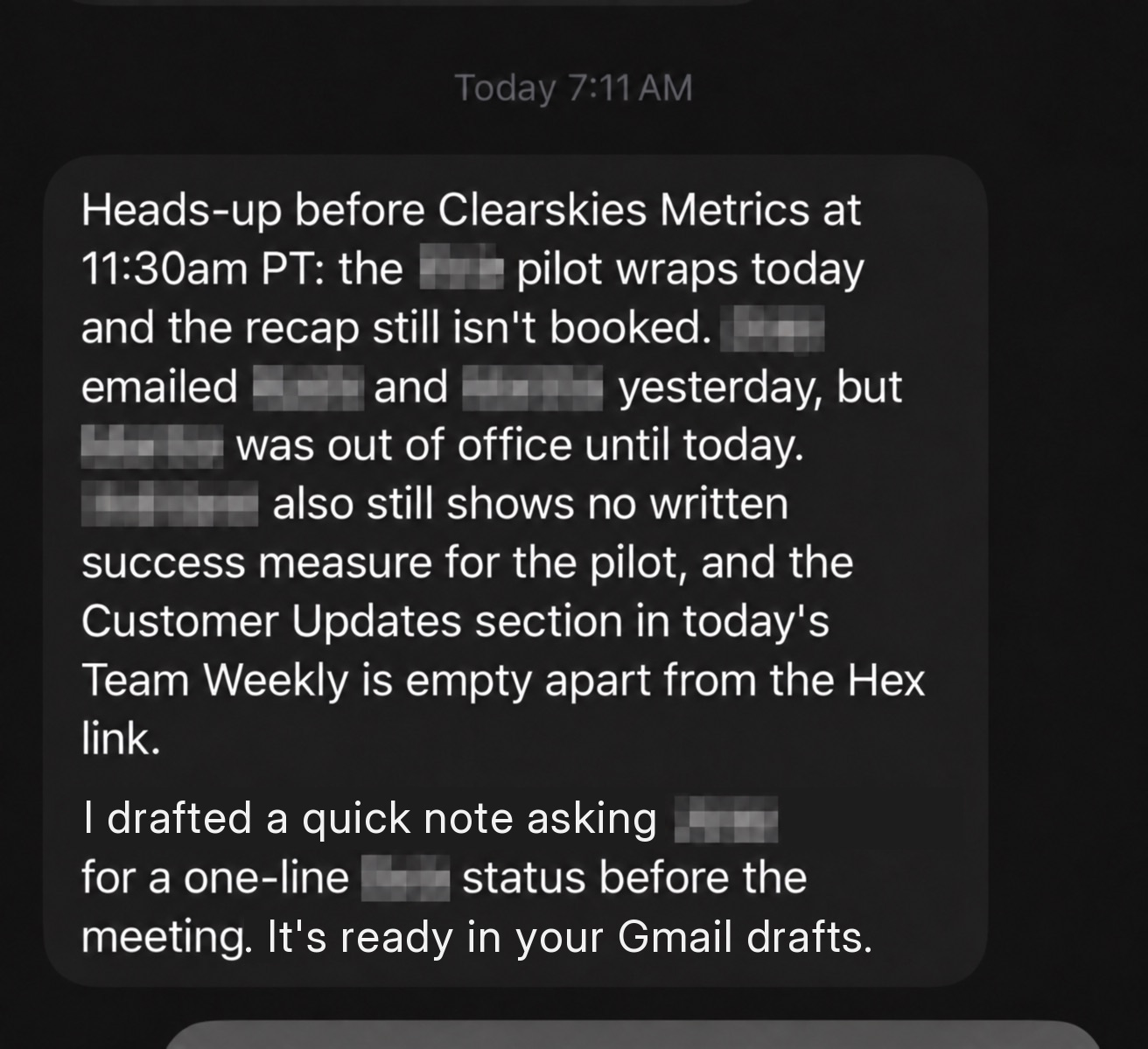
What it looks like
Setting up the context layer takes about thirty seconds of your attention. You connect the CRM, the call recorder or recorders (plenty of teams have more than one), email, calendar, and Slack, and the matching happens in the background: identities resolved, each activity attached to the right account, one timeline per customer. What you end up with is one connection you can point any AI at, so you point three at it: Claude, ChatGPT, and Grok Bot. We put together this short demo to show how it comes together. The demo itself was made with Clearskies, Grok Bot, ElevenLabs, and a few design tools our team uses.
If you want to try it on your own data, start at app.clearskies.cc, or book a walkthrough and we’ll do it with you.
Pouyan Salehi is the cofounder and CEO of Clearskies, The Context Layer for Revenue. He previously cofounded Scratchpad and PersistIQ. If you’re working through this at your own company, connect with him on LinkedIn. He’s happy to compare notes.
Thanks again to Pouyan (and Nate!) for today’s article. Like I said at the top, I think this piece is going to help a lot of revenue teams. And this topic (the context layer as a P0 to operationalize AI for revenue teams) will become more important over time.
As always, thank you for your attention and trust. I do not take it for granted.
See you Friday for our GTM Weekly Round-Up,
Brendan 🫡
[Disclaimer: Clearskies is one of our sponsors at The Signal. They didn’t pay for this post. They mentioned they were working on this piece on a call, and I asked if I could publish it here because I thought it was valuable. But again, they’re a sponsor of The Signal, so I wanted to be explicit about that.]
An interesting part of what you’re saying from a practitioner which has suffered from not enough loud alerts, plumbing errors when models update, and a number of other things is that it’s important to understand which part is linear/predictable (ie code) vs probabilistic (ie LLM inference). So a proper closed loop system needs to be thought through with that vision in mind in order to scale. Just my 2 cts.
Btw this resonates with thoughts I’ve been having for the past weeks in the work that I’ve done