


If you were forwarded this newsletter, join 6,517 weekly readers—some of the smartest GTM founders and operators—by subscribing here:
Thanks for reading this hand-rolled, 100% organic, farm-to-table (human-written) newsletter.

Presented by Clay.
Bring AI agents, enrichment, and intent data together and turn insights into relevant, timely action. Start building for free.
& Supported by:

Attention → AI Agents for RevOps
Clarify → The Autonomous CRM
Nooks → Agent Workspace for Intelligent Outbound
Sumble → Buying signals from tech stacks, people data, & active projects

Hey y’all! 👋
I recently sat down with Eric Nowoslawski to talk about how he’s building one of the most technically advanced AI-powered cold outbound machines in the world.
In fact, he may be the best person I know when it comes to modern-day outbound. Hard stop. Fun fact: I have had notifications on for his LinkedIn posts for the last couple of years. I don’t have notifications on for anyone else. He’s that good at outbound—and sharing what he’s learning. So, I was excited to codify his current thinking in Q1 of 2026, as it relates to outbound, how he’s using AI, what tools he’s using, and much more.
This post is longer than usual, so feel free to skip sections that aren’t relevant to you (I couldn’t bring myself to cut any more gold nuggets from what he shared with me).
Eric runs Growth Engine X. Which has 52 concurrent clients (he’s worked with companies like Notion, Intercom, Instantly.ai, Clay, and Secureframe), he rips 2 billion tokens per day through OpenAI, and has 250 Clay tables running simultaneously.
Maybe most interestingly, he’s also never written a line of code. Until 45 days ago, when he started using Cursor and Claude Code. But since then, he’s written 2 million lines of code.
Here’s what we cover:
Claude Code vs. Clay (and when to use each)
The GTM tech stack: Flexibility vs. power
How GTM teams should learn AI coding
The marshmallow test for building internal tools
How Eric cut a $15K/month OpenAI bill
Top 3 changes in outbound in the last 6 months
Summary
Follow Eric on LinkedIn! https://www.linkedin.com/in/outboundphd/ (👈 I mean… even his LinkedIn URL tells a great story!)
Claude Code vs. Clay: When do you use each?
A year ago, the people I knew who were going all-in on Clay have added Claude Code to their stack since the start of this year.
Eric’s take: It’s an obvious evolution. Clay’s original hypothesis (when it was founded 8-9 years ago) was to give software engineering powers to as many people as possible. They thought a spreadsheet interface would help visualize integrations since people were used to Excel.
The company blew up when they found the GTM use case (and particularly, with agency owners at the beginning—including Eric’s agency). That’s why it’s a household name in go-to-market now.
But Claude Code gives software engineering capabilities to everyone on another level. Instead of setting up columns and clicking around, you can use your voice to set things up. And it compounds—when you figure something out once, you save it and reuse it.
Why Clay still matters:
Edge cases and visual building. Even with perfect models, some edge cases are easier to solve with a visual builder.
Software maintenance. People underestimate how much effort it takes to maintain code. Eric had something working perfectly two days ago—it’s broken now.
Claygent. Still a marvel of a GTM feature.
API queuing. Clay’s native integrations handle rate limits automatically. If Prospio has a 10 requests/second limit and you’re hitting it across 50 tables, Clay manages that. With Claude Code, you’d have to build that yourself.
Pre-negotiated contracts. Clay has 150+ data providers. Some you can get APIs for directly, but many are pre-negotiated. Maybe you just want one data point from HG Insights—do you want an HG Insights contract, or do you want to spend a few Clay credits?
Eric’s current split:
Claude Code handles TAM building and email finding. Then everything flows into Clay for “final mile delivery”—whatever AI enrichment needs to happen, Claygent calls, and pushing leads into SmartLead.
The GTM tech stack: flexibility vs. power
I shared a framework with Eric that I continue to revisit: a visual of how GTM tools trade off ease of use against flexibility and power.
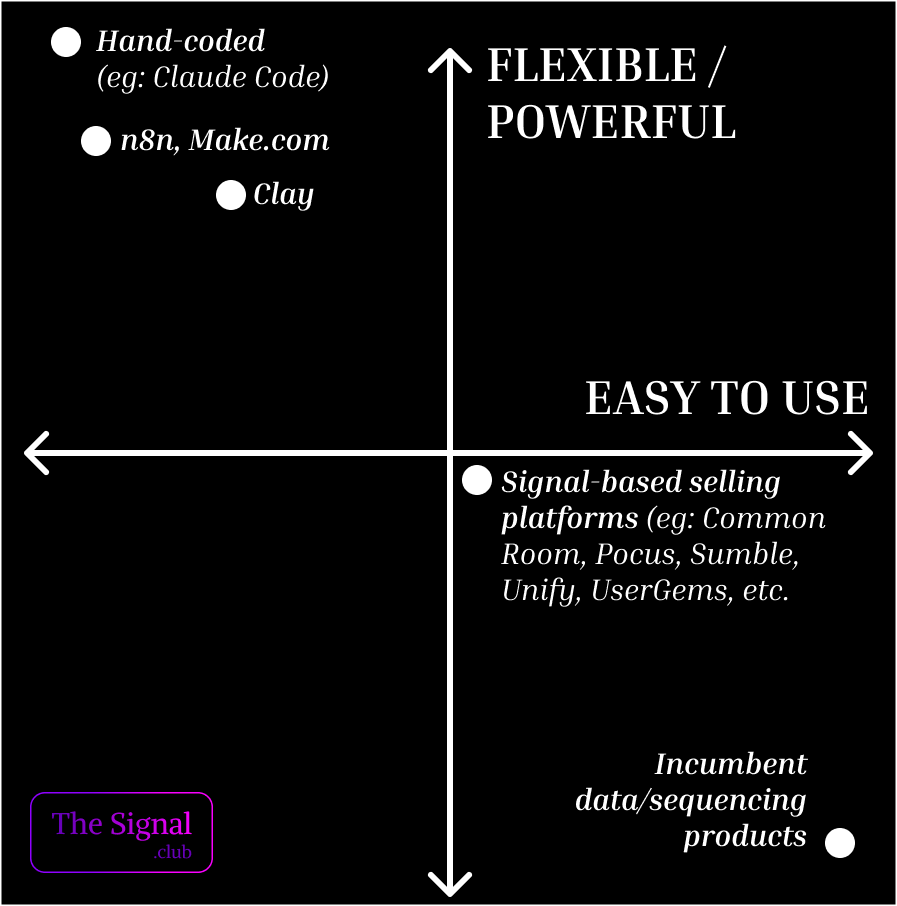
In the bottom right: Incumbent data and sequencing tools. Super easy to use, but not very flexible or powerful.
In the middle: Signal-based tools that productized signals/automation (think: person-level intent that’s much better than 6Sense/Demandbase). More powerful, but harder to use.
Further up: Clay. Pretty hard to use, but very flexible and powerful.
Even further: n8n and Make.
At the very top left: Hand-coding something (using Cursor, Claude Code, etc.). Most powerful and flexible, but historically the hardest to use.
What’s notable in this current moment in time is that all of these tools are rapidly getting easier to use as vibe coding (AI) improves with the models. Clay is already easier to use than it was a year ago (see: Sculptor). AI coding is getting easier (Lovable is a great example—an incredibly easy UI sitting on top of coding); people who can’t write a line of code are now shipping software. And now, Claude Code.
For GTM leaders, the question isn’t “which tool should I use?”
It’s “where on this spectrum should my team be investing time?”
The answer is probably: move up the curve faster than you think you should.
Here are the tools Eric is actually using day-to-day in his agency:
Prospeo → contact and company data
RapidAPI → access to various APIs
Clay → orchestration and final mile delivery
Apify → web scraping
Exa and Parallel.ai → AI-powered search
Supabase → database
Railway → internal apps
Trigger.dev → background workers and jobs
The world is kind of my oyster” with these tools. Between them, I can build almost anything I need without waiting on engineering.
–Eric
How should GTM teams learn AI coding?
I asked Eric if companies should hire external help or train their internal teams.
His answer: Everyone needs to use these tools. It’s mandatory. He went on to say:
We’re in a bubble.
(If you’re reading this newsletter, you’re likely at the bleeding edge of AI x GTM. But, the vast majority of the world has not ‘seen the light’ yet.)
Eric told me a story. His brother’s wife went to Princeton, works at BlackRock, has been promoted multiple times (she’s a very smart person). She only started using ChatGPT two months ago. She has no idea Claude is a product!
We think everyone knows how easy it is to scrape Google Maps or enrich a CRM. They don’t.
Someone at McKinsey told Eric their biggest challenge for some portfolio companies is updating job titles in their CRM. Eric’s response: “Oh, do I have a plan for you.”
The problems are basic. The solutions are now accessible. That’s the gap.
He tells his team constantly: You must use these tools. And as a leader, it’s incumbent on him to give them access while maintaining a security posture (some platforms don’t offer individual employee API keys, so he’s working around that with sandbox environments.)
This is true for Eric, as an agency owner. But I believe it is also true for a CRO at a SaaS company. The most “AI-native” teams I’ve come across are those where the CEO is personally vibe-coding at night, and execs are constantly using AI to get things done faster. This naturally trickles down.
Five things everyone in GTM should try with Claude Code:
Customer insight discovery. Look at your CRM—leads from last month, closed deals, lost deals. Find patterns between them.
Basic TAM building. Connect to an API like Prospio. Pull your entire TAM and put it into a database.
Build your own database. Pay $3 for Supabase. Get used to what it feels like to have your own data infrastructure. (Note: this is obviously not feasible for MM/Ent orgs, where there is data governance and structures already in place, like a data warehouse)
Analyze your recorded calls. Pull all your calls, ask Claude questions. How could I improve? What do we talk about most often? (Tools like Attention.com are custom-built for this)
Build your own email finder. Most email tools just guess permutations and validate. Get a MillionVerifier account, guess the six most common email permutations, validate all of them. The one that comes back valid is the email.
The compound learning effect:
Eric reminded me that the more you use Claude Code, the more it knows what good looks like. How you want things written. How you built things in the past. Eventually, you’re one-shotting things. But, you have to start small/narrow.
One more thing for GTM leaders:
I made the point during our conversation that AI doesn’t replace people; it scales whatever you already have. If you’re good at writing emails, AI scales good emails. If you’re sending bad emails, it scales bad emails.
AI amplifies existing quality. It doesn’t create quality from nothing. The companies that will win are the ones with strong fundamentals—good positioning, good offers, good copy—who then use AI to scale those fundamentals.
This is why “AI will replace SDRs” misses the point. The real question is: which SDR teams have the foundations worth scaling?
The marshmallow test for building internal tools
Every Friday, Eric used to spend four hours on domain management:
Pull all domains across all customers
Get reply rates for 7-day and 14-day windows
Put it in a spreadsheet
Manually calculate averages per client
Flag anything outside the average for cancellation
Upload cancellations to a sheet
Move backup domains to active
Order new domains
Update Supabase
(That’s a short version. There are more steps.)
The framework:
What is the overall thing you want to accomplish?
What are the tiny steps within that?
What API documentation is tied to each step?
What does “done” look like for each step—not just the end?
The marshmallow test (the team-building exercise where you build the tallest tower with spaghetti and a marshmallow).
The teams that win build version one, make sure it works, then build version two on top. The teams that lose say, “We think we can make this two feet high,” and build the whole thing at once.
Eric advises to start: don’t have Claude build the whole thing. Build itty bitty fraction steps.
First, get me the replies of just one customer.
Get me the domains and replies of five customers.
Now get all of them.
Now give me suggestions for which to cancel (reply rate below 0.7%).
Do micro tests. Verify each step. Describe in the prompt what you’re testing and how you’ll verify it. Manually review the output and correct what’s wrong and update the prompt accordingly.
Your code base will grow. Claude will learn what you want. And eventually, you’ll one-shot things. But start small.
Bonus tip: The Loom transcript trick
Eric tells his team that when you’re doing something manually, record a Loom video while narrating what you’re doing. Talk through each step out loud.
Then take the transcript and give it to Claude.
Now you’ve done two things at once: you got the actual work done, and you have documentation for automation. Claude can read exactly what you did and start building a version that does it for you next time.
Think of it like you’re training a (digital) co-worker.
This is especially useful for tasks you do repeatedly but haven’t had time to automate. You’re not adding extra work. You’re just narrating while you work. The transcript becomes the prompt.
How Eric cut a $15K/month OpenAI bill
Once you’re operating at Eric’s scale—2 billion tokens per day across 52 clients—cost optimization becomes real.
Eric was spending $15,000 per month on OpenAI. Enough that he got assigned an enterprise account rep.
When he told her he was thinking about switching to open-source models on OpenRouter, she didn’t try to sell him. She asked: “Have you tried the Batch API and cached inputs?”
Solution 1: Batch API
For high-volume clients (the ones sending 30,000-100,000 emails per day), Eric moved to the Batch API. Instead of processing leads in real-time, they plan out every lead they’re going to reach out to and process them all in a single, cheaper batch.
Solution 2: Cached Inputs
This one is buried in OpenAI’s pricing page. If you send the same prompt prefix repeatedly, OpenAI recognizes it and gives you 50% off input tokens for the cached portion.
The trick: most GTM people structure prompts like this:
Tell it what you want
Give it the data
Add constraints and rules
Add examples
The OpenAI rep told Eric to flip it—move the variable data (step 2) to the end of the prompt. Keep the instruction layer static. That triggers cached inputs more often.
It’s not an exact science. It doesn’t trigger every time. But at scale, it triggers enough to matter.
Future cost reduction: Rented GPUs
Eric went down a rabbit hole on Vast.ai—renting GPUs to process AI requests for $0.60/hour. He got a GPU up to 16 requests per second on a 5,000-token input. At scale, that’s a million requests per day for $12-13.
His first use case: Google Maps contact finding. When you’re trying to find the CEO of a business that doesn’t have a LinkedIn profile, you need to scrape their website, parse through the content, and extract the owner’s name and email. That’s a lot of input tokens with potentially no output. Perfect task for cheap compute.
Top 3 changes in outbound in the last 6 months
1. Domains are dying faster than before.
Eric has observed that domains are getting burned quicker ever before. This is why he built the system he described earlier—the one that takes four hours every Friday to manage across 52 clients.
The system tracks:
How many domains are active across all customers
Reply rates over 7-day and 14-day windows
Which domains are underperforming (below 0.7% reply rate)
How many backup domains are ready to rotate in
You need a system to monitor this at scale (especially as an agency owner), and you need backup domains ready to go. Eric keeps his budget flat by constantly rotating (canceling underperformers, moving backup domains to active, ordering new ones).
If you’re running high-volume automated cold email in 2026 and don’t have a domain health monitoring system, you’re flying blind. For most companies, building in-house, SmartLead or Instantly solves this for you.
2. LinkedIn strategy (don’t orchestrate with email):
Eric helps clients with LinkedIn but won’t press the buttons—too much liability if accounts get banned (I agree).
But his advice on strategy is clear: don’t orchestrate LinkedIn with email. You can send way more emails than LinkedIn messages. There’s gold in LinkedIn contacts that email can’t reach.
Instead, use LinkedIn sparingly—for these three plays:
Monitor case study company pages. When someone in your ICP engages with a post from your case study company, reach out. Don’t say “I saw you liked Clay’s post.” Say “I’m a video agency and I do the video stuff for Clay. Would love to talk.”
Website de-anonymization. Install every tool—Leadfeeder, Snitcher, RB2B, Visual Visitor. Use their free trials. Whichever gets you the highest reply rate, keep it. Automate LinkedIn messages to people who visit your site.
Competitor content engagement. Anyone in your ICP engaging with your competitors’ content gets a normal outreach message (don’t mention the engagement).
3. Email as an ad platform:
This idea has been in Eric’s head for two years. Cold email has become an ad channel.
Facebook’s data shows the advertisers who test the most make the most money. Best advertisers run 50+ ads simultaneously.
The difference: Facebook makes it easy to orchestrate tests. You set up your audience, click a few buttons, and the test is running. Facebook even finds the best-performing audience for you.
With cold email, orchestrating the list to enable 20+ simultaneous tests was painful. You had to set up SmartLead campaigns, Clay tables, formulas to route leads to the right campaigns...
Now with Claude Code? Set up SmartLead campaigns programmatically. Distribute inboxes programmatically. Write if-then statements for routing. Launch 20 campaigns in one go.
Treat cold email like Facebook ads. Run 20-50 campaigns at once. Test subject lines, CTAs, case studies, offers. The technology finally makes this possible.
TAM requirements: Why 100K contacts is the minimum
Eric believes you need 100K contacts in your market to do automated outbound (especially if you’re paying an agency). He won’t take clients with fewer than 100,000 contacts in their TAM.
Why?
Paying an agency for a 4,000 account TAM doesn’t make sense. Even if Eric is successful, he’ll be successful for a month or two, then they’ll run out of people to email.
He still thinks those companies should do cold email. But instead of paying agency fees, they should set it up themselves with Instantly or Smartlead for $500-1,000/month. And do less scale.
Summary
Eric is building what I think the best GTM teams and agencies will look like in 2-3 years: AI-powered infrastructure that delivers outcomes.
The key themes:
We’re in a bubble. Most people have no idea what’s possible with these tools. The problems are basic. The solutions are now accessible. That’s the opportunity.
Claude Code is the next tool in the stack. The GTM engineers who mastered Clay are now building with Claude Code. But Clay still has a role for edge cases, maintenance, and native integrations.
Move up the flexibility/power curve. The tools are getting easier. If you’re only using incumbent sequencing tools, you’re already behind. If you’re on Clay but haven’t touched Claude Code, start now.
The leadership mandate is real. Eric tells his team: “You MUST use these tools.” It’s the leader’s job to give access while maintaining security. This isn’t optional anymore.
Start small with AI coding. Break everything into micro-steps. Verify each one. Build your code base over time. Don’t overthink organization—AI will find what it needs.
AI scales your existing quality. Good foundations get amplified. Bad foundations get amplified, too. Invest in the fundamentals first.
Treat email like ads. The technology now exists to run 20-50 simultaneous email campaigns. The best outbound teams will operate like the best media buyers.
100K TAM minimum. If you can’t scale, don’t pay agency fees. Do it yourself.
The gap between operators building this way and everyone else gets wider every month.

Follow Eric Nowoslawski on LinkedIn — He posts daily on cold outbound and AI-powered GTM.
→ Eric runs Growth Engine X, working with clients including Notion, Intercom, Instantly.ai, Clay, Secureframe. Talk with him if you’re looking for help scaling your outbound engine.
Thank you for your attention and trust,
Brendan 🫡
It's pretty amazing to plug into someone's brain like this. Someone who is deep in it each day when many of us are more generalist.
Good post.
did you get any insight into how operating at this high of a level improves outcomes for the clients he is working with?